
Procurement Process & Support
-
- Identity Provider (IdP): The Foundation of Sastrify Insights
- Uncover SaaS Usage and Shadow IT with Identity Provider (IdP) Discovery
- Integrating HRIS to Enrich Identities & Insights
- Admin Guide: Deploying the Sastrify Chrome Extension
- Admin Guide: Deploying the Sastrify Microsoft Edge Extension
- Manual Installation Guide: Sastrify Chrome Browser Extension
- Manual Installation Guide: Sastrify Edge Browser Extension
- Setting renewal dates & reminders
- Assigning & Modifying Subscription Owners
- Uploading & Managing Your SaaS Documents in Sastrify
- Sastrify App Support: Get Help & Give Feedback
- Sastrify's commitment to security and privacy standards
- Integrating HRIS to Enrich Identities & Insights
-
- Capturing Subscription Details with Contract AI
- Adding a New Subscription Manually
- Slack Integration: Bringing Sastrify into Your Internal Communication
- How to bulk upload your invoices
- Automating Document Uploads via Email Forwarding
- Managing Your Notification Preferences
- Tools and Spend Importer: Bulk Upload & Visualization
- Tool Matching: Aligning ERP Data with Your Inventory
- Managing Collaboration with Custom Tasks
- Task Automation: Standardizing and Automating Routine Actions
-
- Workflows: Automate procurement processes with consistency
- Requests: Streamline procurement process and internal approval
- Get Procurement Support for New Purchases and Renewals
- How to submit and track Procurement Requests via Jira Integration
- Scope of service: Custom benchmarking & contract review
- Scope of service: Negotiation & renewal support
- Scope of service: Custom SaaS Optimization Advisory
- Purchase your SaaS through the SastriMarket
-
- Connecting Your ERP & Accounting Software
- Spend Import: Validate and fine-tune your imported spend data
- Export spend data from Candis to Sastrify
- Export spend data from Spendesk to Sastrify
- Export spend data from Pleo to Sastrify
- Export spend data from Moss to Sastrify
- Export spend data from DATEV to Sastrify
- Export spend data from Ramp to Sastrify
-
- Configuring Authentication & Access
- User Management: Managing Users and Platform Roles
- Configuring Microsoft SSO Authentication
- Configuring Okta SSO Authentication
- Configuring JumpCloud SSO Authentication
- Configuring Cisco Duo SSO Authentication
- Configuring Cloudflare SSO Authentication
- Configuring OneLogin SSO Authentication
- Having trouble logging in?
- Understanding user roles and permissions
-
- Okta M2M Integration Guide
- Accounting & ERP: Connecting NetSuite to Sastrify
- Accounting & ERP: How to connect Quickbooks
- Accounting & ERP: How to connect Microsoft Dynamics 365
- Accounting & ERP: How to connect Workday ERP
- Accounting & ERP: How to integrate Pleo with Sastrify
- HRIS: Connecting Officient to Sastrify
-
- ERP & Accounting Integration FAQs
- SSO / IDP Discovery Integration FAQs
- Browser Extension FAQs
- HRIS Integration FAQs
- Usage Analytics FAQs
- Contract AI & Subscription Details FAQs
- Tools and Spend Importer FAQs
- Invoices FAQs
- Achieved Savings FAQs
- Form component guide for Sastrify form builder
- What is SaaS and Sastrify's scope of work?
- Who receives the renewal alerts or reminders?
- How does Sastrify work with currencies?
- Is the spend data from accounting export always up-to-date?
- How to work with benchmark prices
- When and how to involve Sastrify in a contract evaluation or negotiation?
- How does Sastrify interact with SaaS vendors?
- How do you handle confidentiality clauses in vendor contracts?
- Why is contract data essential for benchmarking and negotiation support?
Purchase your SaaS through the SastriMarket Print
Modified on: Wed, 17 Sep, 2025 at 2:01 PM
Sastrify benefits from unique partnerships with category-leading vendors around the world. You can take advantage of them by purchasing your licenses directly from us!
The benefits of buying SaaS through Sastrify
Fast: Save time buying 10x faster compared to engaging directly with vendors
Easy: Buy with ease and get our best offer immediately—zero negotiations required
Great prices: Save money via our exclusive deals with leading vendors, between 10% and 30% compared to the list price
Other benefits
Stay ahead of price and product updates through proactive recommendations
Free choice of payment via credit card or bank transfer
Payment options available: annual, quarterly, monthly, flex
How does it work?
- Sastrify will provision the licenses on your behalf either through our marketplace or through the vendor.
- You are billed by Sastrify only.
- The terms & conditions of the vendor and Sastrify apply.
- Depending on the licensing model of the vendor, contract commitments can be monthly or longer.
What is the process?
- You express an interest in purchasing licenses through Sastrify by contacting your account manager.
- Together with the account manager, the Marketplace Team will check feasibility with the vendor.
- If the vendor accepts our request to sell to you, a proposal will be sent to you for signature.
- After the proposal has been signed, Sastrify will take care of the provisioning of licenses for you.
Note that depending on the vendor, the process can take a few days or up to a few weeks. Please approach the Sastrify team as early as possible, as last-minute requests can be difficult to process.Which tools can you buy through the SastriMarket?
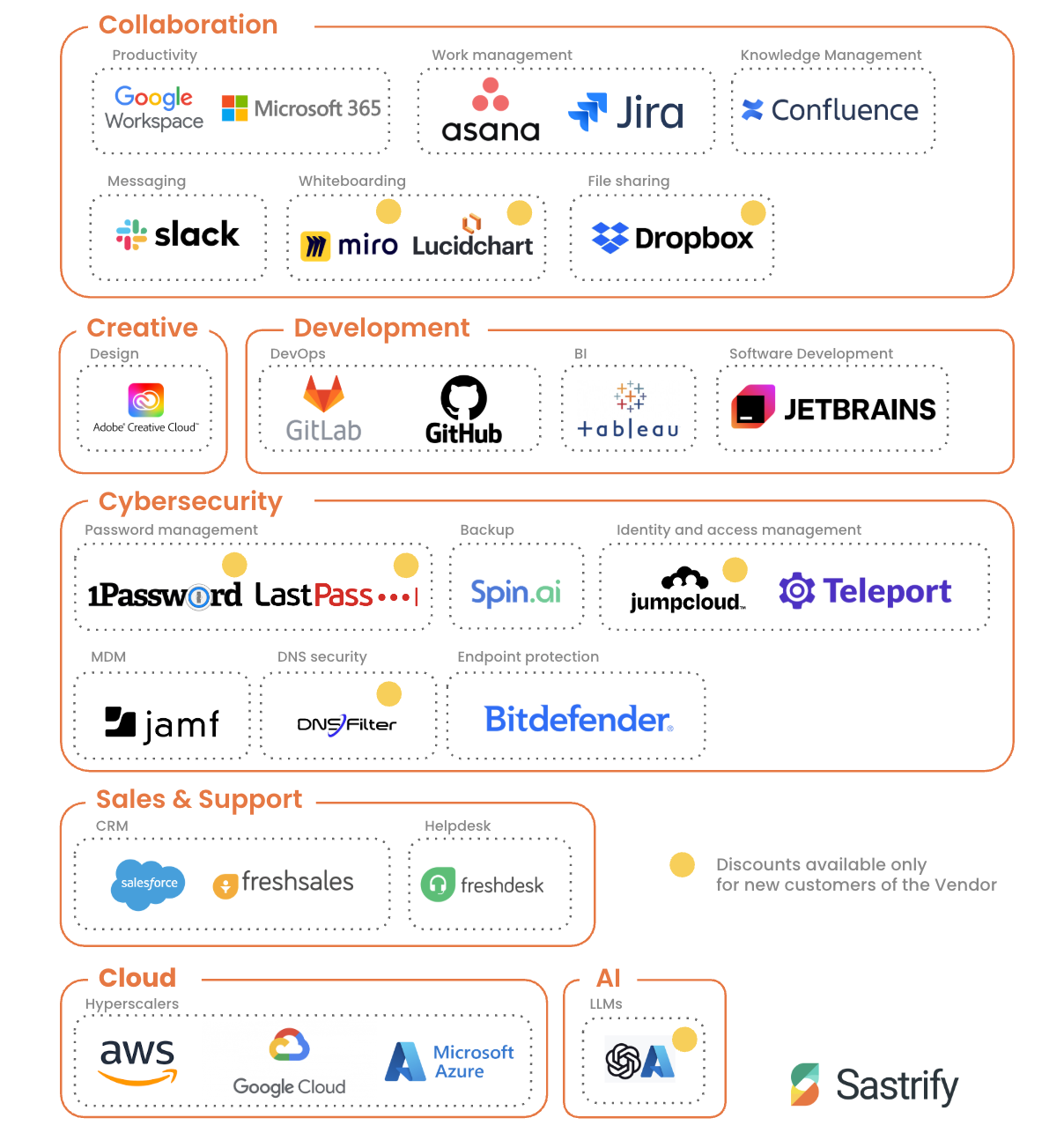
If you are interested in new software and you see that Sastrify is a partner of this particular vendor, do not approach the vendor by yourself. Instead, contact your Sastrify team, and we will set up a meeting with the vendor. This way, you will benefit from exclusive Sastrify discounts.
Did you find it helpful? Yes No
Send feedback